
Compass Learning
Dear Parents,
Your child has access to Compass Learning Odyssey, a web-based curriculum, to enhance their educational experience. This letter is to inform you about the basics of Compass Learning. This program has a variety of tools to support learners in math, ELA, social studies, and science. These tools include instructional videos, practice lessons, quizzes and assessments. When your child is not able to demonstrate an understanding of the lesson in the activities, the program automatically replays the instructional video for your child to view again.
Assignments in Compass Learning are assigned automatically to your child from two sources: NWEA input and teachers. The activities placed onto your child’s homepage (known as Launch Pad) from the NWEA and are based on identified areas of growth from your child’s most current NWEA scores. There might also be activities on your child’s home page that were assigned by your child’s teacher(s). These assignments usually have the teacher’s name as a part of the title. These were assigned as another way for your child to practice or review a skill. The assignments are all related to the Common Core and Maine Learning Results and are directly connected to our building’s curriculum and our proficiency-based model of instruction.
To monitor your child’s progress, you can view work under two tabs (Recent Work or Assignments) that are located in your student’s portfolio. Each tab will give you a list of assignments, the date your child worked on them, a score (if applicable), and the status of each assignment. The status is shown when the notebook paper changes color (blue). Also under the student portfolio, you and your child will have access to the following features: assignments, learning activities, chapter tests, lesson quizzes and objective-based tests.
Setting up Compass Learning on your computer
In order to proceed successfully, your computer must have a certain operating system and plug-in options. Click the Check System button on the Compass Learning home page to start a system check.
To log in to Compass Learning visit http://www.compasslearningodyssey.com.
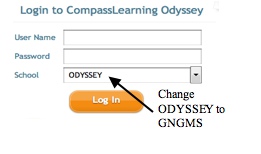
User names and passwords will be distributed at fall conferences. If you do not receive your information at that time, please call our Main Office at 657-4994. In addition, the 3rd section of the login window should read School. Please enter GNGMS at that prompt.
For additional assistance in setting up your systems, refer to Compass Learning’s support page at:
https://www/thelearningodyssey.com/LoginContent/systemrequirementsworkstation.pdf.
You can also contact Compass Learning for support by emailing: support@compasslearning.com
or on the web at http://www.compasslearning.com/customer-support.
We recommend that students work for a minimum of 60 minutes a week (2-3 sessions). We encourage you to support the use of Compass Learning at home.
Please contact Amanda Hennessey at 657-4994 or ahennessey@sad15.org with questions.